

How to Visualize Furniture Placement using 3D Virtual Tours
If you want to tackle visualizing furniture placement with 3D virtual tours, you’ll need some prep work first! From picking the right platform to leveraging their potential, there’s a lot to consider!
Choosing the Right Virtual Tour Platform
To maximize the impact of your virtual 3D tour, you need to pick out the right platform! The main things you must pay attention to when making your choice are pricing, features, and how easy the platform is to use. Thankfully, you can’t go wrong with the more popular choices, such as iGUIDE or Matterport.
The reason these platforms became popular is that they are accessible, even to relative beginners and come with a variety of pricing plans. This way, even if you unlock the more ‘basic’ versions, you can still use them to the fullest because they will match your skill level. Nevertheless, do put some time and effort into browsing reviews and recommendation sites. With the feedback, you can be more certain of your choice and tailor it better to your needs!
Preparing Your Space for Virtual Touring
To get the best benefits from virtual reality, you must do some prep work in the real world! Here is what you should do:
- Start cleaning and decluttering your space. This is necessary because you’ll need to base your virtual world on something, and all the clutter and everyday ‘garbage’ such as extra shopping bags, messes you typically overlook, and similar will get in the way of that.
- Stage your space a little to get the best look and prep a ‘base’ for your virtual experimentation with furniture.
- The other option is to entirely empty out rooms in your home, one at a time so you can start entirely from scratch. This would be a pretty good idea if you want to change your current furniture setup!
Capturing Your Space with a 3D Camera
When your home is as ready as you’d like it to be, it’s time to craft the ‘bones’ of your virtual tour. For the sake of the process, you will need a 3D camera. Now, this does come attached to certain VR headsets and systems. However, there is a more DIY solution! You might be relieved to know that there ARE phone apps out there that can work nearly as well! Of course, they will depend on your phone’s camera quality.
Still, that’s a much cheaper fix than a dedicated piece of hardware you might not use often. With a camera in hand, you need to make sure your home is properly lit, then go room by room and try to capture all angles and corners! The clearer each shot is and the more thorough you are in your 3D shoot, the better the tour quality!
The best software you can use Autodesk Revit & Matterport Integration
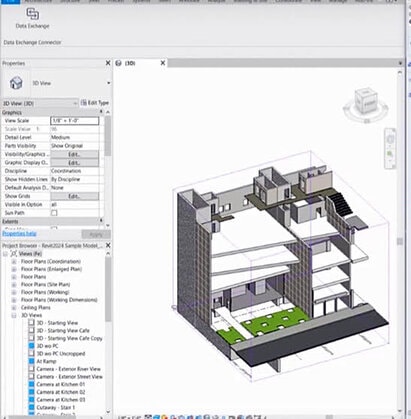
Revit is commonly used for architectural design and includes tools for creating detailed building models. It can be used to design room layouts and place furniture within these layouts. Of course, it’s necessary to design your building or interior layout in Revit, including walls, doors, and windows. Then, you’d need to populate the rooms with furniture items available in Revit’s library or imported from other sources. After finalizing the design, you’d then export the model to a format compatible with Matterport, such as FBX or OBJ. Finally, the model can be imported into Matterport to create a 3D tour where viewers can navigate the space and see the furniture placement.
Level of expertise for this software: You better have a college degree
SketchUp & Matterport
SketchUp is known for its simplicity and ease of use in creating 3D models. It’s suitable for quickly visualizing furniture layouts and interior designs. The process of using it would be to design or render your interior layout in SketchUp, including walls, floors, and furniture. Thankfully, SketchUp’s extensive 3D Warehouse library provides a wide range of furniture models you can easily import into your design. Once the layout is complete, export the model to a compatible format for Matterport, such as OBJ or Collada (DAE). Then, just import the model into Matterport to create a virtual tour showcasing the furniture placement.

Unity 3D Integration
Unity offers advanced capabilities for creating interactive 3D experiences, making it suitable for immersive virtual tours with detailed furniture placement. You need to import your CAD models or design furniture directly within Unity using its modeling tools or asset store resources. Of course, it’s also possible to include interactive elements, such as clickable furniture items, to provide additional information or links. Once the design and rendering are complete, integrate Matterport 3D tours within Unity so it’s possible to embed them into the environment. This allows viewers to explore the space seamlessly while interacting with the furniture and other elements.

Blender & Matterport
Blender is a versatile 3D creation suite that allows for detailed modeling and rendering. It’s suitable for creating custom furniture models and designing intricate interior layouts. You simply need to have your chosen professional design your furniture items and interior layout in Blender, utilizing its modeling and texturing tools to create realistic representations. Once the design is complete, they can export the model to a compatible format for Matterport, such as FBX or OBJ. Then, you import the model into Matterport to incorporate it into your 3D virtual tour, allowing viewers to explore the space and interact with the furniture!

The reasons you need professional assistance
Fleshing out your tour’s design and rendering the necessary elements is not easy. In fact, it’s pretty much guaranteed that you’ll need professional assistance! Here are just a few reasons why:
- Expertise in Space Planning: Design professionals, such as interior designers or architects, possess expertise in space planning. They can optimize the layout to maximize functionality, flow, and aesthetic appeal within the given space.
- Understanding of Scale and Proportions: Professionals have a keen understanding of scale and proportions, ensuring that furniture pieces fit harmoniously within the space without overwhelming or underwhelming it. This helps in creating a balanced and visually pleasing environment.
- Knowledge of Design Principles: Professionals are well-versed in design principles such as balance, harmony, rhythm, and focal points. They can apply these principles effectively to create inviting and cohesive interiors that reflect the client’s style and preferences.
- Access to Extensive Resources: Design professionals often have access to various furniture and decor options from various suppliers and manufacturers. They can curate selections tailored to the client’s taste, budget, and functional requirements, offering a diverse range of choices for furniture placement.
- Ability to Customize Solutions: Professionals can tailor furniture placement solutions to address specific challenges or goals, such as optimizing natural light, accommodating architectural features, or creating designated zones for different activities.
- Visualization Skills: Design professionals are skilled at visualizing spatial configurations and understanding how different elements interact within a room. They can create realistic 3D virtual tours that accurately depict the proposed furniture layout, allowing clients to visualize the end result before making any commitments.
- Cost and Time Efficiency: While hiring professional help may incur additional costs, it can ultimately save time and money by avoiding costly mistakes or inefficient furniture arrangements. Professionals can streamline the design process, ensuring the final layout meets the client’s needs and expectations.

Navigating and Interacting with the Virtual Tour
With your tour done, accessing and interacting with it should be quite easy. You can get a pretty in-depth experience even on a regular device. If you’ve done the capture correctly, you’ll have the option to zoom in on every corner of the rooms, properly gauge space and size differences, and examine every angle and area more closely using the interactive features of your selected platform.
However, we recommend exploring your VR tour if you have the appropriate equipment! 3D tours really come to life with these devices, and you’ll feel like you’re exploring your home in person. This will make it much easier to tackle visualizing furniture placement with 3D virtual tours later! Besides, while devices like tablets, PCs, or smartphones are convenient, they simply lack the depth that VR provides.
Working on Real-Life Furniture Placement
Once you have everything worked out virtually, it’s time to tackle the organization of your home! One thing you need to keep in mind is that things will not be as easy as the virtual world might lead you to believe. After all, it’s easy to get carried away in a virtual world. However, you’ll need to haul furniture around to sort everything out! So, go slow, go steady, and don’t tackle moving furniture pieces that are too heavy for you to handle.
Depending on where you live, you will have various options for hiring help. So, if you are lucky enough to live in Florida, great-quality movers can help with this task. If you have to move very heavy items, look into hiring household movers in Florida. Local household movers can help out with the heavy lifting and ensure that every piece of your furniture goes exactly where you want it—all without you having to risk injury to your back while working on your own!

Collaborating and Sharing Your Virtual Tour
Thankfully, making smart use of virtual tours is not limited to what you can do on your own! Once you have your 3D space set up, you can share it. In other words, you can link up with designers, clients, or any other professional or interested party. This opens up the possibility of tapping into their skills, interests, and expertise! A designer can offer the newest and most popular furniture catalogs and tips on designing the feel of the rooms.
Meanwhile, having feedback from potential house buyers can be even more invaluable! You should try to design virtual tour samples that fit their preferences. If you do, you make it much easier for them to get attached to the idea of buying your home. In turn, you both directly increase the appeal of your listing and boost its value in the eyes of buyers!

The appeal of visualizing furniture placement with 3D virtual tours
Visualizing furniture placement with 3D virtual tours will make it much easier for you to design your spaces the way you want them to be! You won’t need to go through endless furniture shuffling. And you won’t even need to purchase any pieces until you’re sure you want them! So, don’t hesitate to try this amazing tool and make the most of it.